
Free Fire Invisible Space – Copy the Character That No One Can See
Generate invisible characters for stylish Free Fire names instantly.
What Is Free Fire Invisible Space?
An Invisible Space FF is a special blank character that looks like an empty space but recognized by the game. You can use it to create a more unique nickname, arrange letters in a different way, and give your profile a stylish look.
In this game, a regular space does not always work inside a nickname. That’s why an Invisible Space for Free Fire is a great way to create custom names without adding visible symbols. The result is a cleaner, more original nickname.
On this page, you can copy an Invisible Space Free Fire with one click and use it in your nickname right away. Simply copy, paste, and check your new name before saving it.
How Does Free Fire Invisible Space Work?
FF Invisible Space works because it is not a normal keyboard space. Instead, it is a Unicode character that looks blank while still being recognized by the system. This allows it to be placed inside a nickname even if nothing is visible on the screen.
The most commonly used character is the Hangul Filler (U+3164). Although it was originally created for the Korean language, many systems recognize it as a valid character.
Open the Invisible Space FF Tool
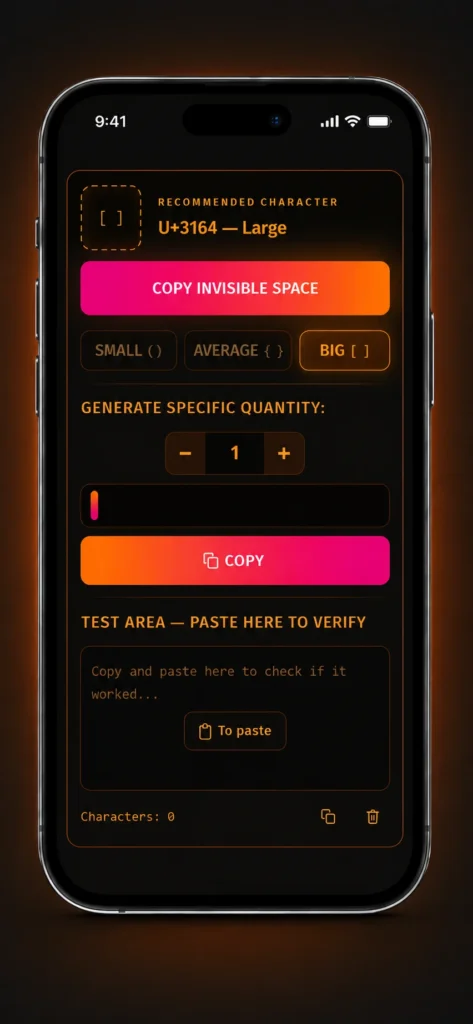
Open the FF Invisible Space tool in your browser. You will see Small, Medium, Large, and Custom invisible space options ready to use.
Choose and Copy an Invisible Space
Select the invisible space you want and click the Copy button. The invisible space will be copied to your clipboard instantly.
Test the Invisible Space
Scroll down to the Test Area and paste the invisible space. This lets you check that the invisible character has been copied correctly before using it in Free Fire.
Generate Custom Invisible Spaces
Enter any number in the Custom box to generate the exact number of invisible spaces you need. Then click Generate to create and copy your custom invisible spaces.
How to Add an Invisible Space to Your Free Fire Nickname
Adding an Invisible Space to your Free Fire nickname is quick and easy. Simply copy the invisible character and paste it while editing your nickname. In less than a minute, you can create a cleaner, more unique name that stands out without using visible symbols.
Copy the Invisible Space
Copy a Free Fire Invisible Space using the tool available on this page.
Open the Nickname Editor
Open Free Fire and go to the nickname editing screen inside your profile.
Choose Where to Place It
Move the cursor to the exact position where you want the invisible space to appear in your nick.
Paste the Invisible Character
Paste the invisible character between the letters or words in your nickname.
Preview and Save Your Nickname
Check how your nickname looks. If you are happy with the result, save the changes.
Features of Free Fire Invisible Space Tool
Finding an Invisible Space for Free Fire that actually works is not always easy. Our tool makes the process simple, fast, and reliable. With just a few clicks, you can copy the invisible character, try different space sizes, and create a nickname that matches your style.
Copy with One Click
No need to manually select or edit text. Simply click the button for the invisible space you want and it will be copied instantly.
Four Invisible Space Options
Choose from Small, Medium, Large, or Custom Invisible Spaces. More flexibility to create different nickname styles without searching elsewhere.
Preview Before You Use
Use the built-in test area to check how your nickname looks before opening the game. Confirm the layout you want first.
No Registration or Downloads
The tool works directly in your browser. Nothing to install, no account needed — open the page and start using it immediately.
Works on Mobile and Desktop
Phone, tablet, or computer — the same smooth experience on every device, whether you play on Android, iOS, or emulator.
Simple for Everyone
Even if this is your first time using a Free Fire Invisible Space, the tool is easy to understand. The interface is clean and every option is clearly labeled.
If you want a fast and reliable way to copy an Invisible Space for Free Fire, test different space sizes, and create a unique nickname — our tool gives you everything you need in one simple page.
Why Use Invisible Space for FF?
Using an Invisible Space for FF is an easy way to make your nickname look more unique without adding symbols. Instead of a plain name, you can create a simpler and organized style that a normal keyboard space cannot achieve.
Make Your Nickname More Unique
A Free Fire Invisible Space gives your nickname a fresh and original look without adding extra symbols or numbers. A small invisible character can make your name stand out while keeping it simple and easy to read.
Keep Your Name Clean
Some players prefer a simpler nickname instead of one filled with special symbols. Invisible spaces help organize your name, making it look balanced and attractive during matches.
Customize Your Nickname Your Way
Use an FF Invisible Space to separate letters, create different layouts, and build a nickname that matches your personal style. Try different combinations until you find the look you want.
Copy and Use in Seconds
Copy the invisible character from this page, paste it into your nickname, and check the result before saving. The whole process takes less than a minute.
Works in Your Browser
No downloads, no installs, no account needed. The tool works directly in your browser on any device — Android, iOS, or PC emulator.
Best Invisible Characters for Free Fire
In the table below you can find the most common invisible Unicode characters used in Free Fire, with their names, codes and compatibility for generating unique nicknames. Among these, the Hangul Filler (U+3164) remains the most popular and reliable character in the game.
| Unicode | Name | Best Use in Free Fire | Copy |
|---|---|---|---|
| U+3164 | Hangul Filler Recommended | Creates invisible spaces in Free Fire nicknames. This is the most commonly used character. | |
| U+115F | Hangul Choseong Filler | Alternative invisible character. May work in some situations but is less commonly used. | |
| U+1160 | Hangul Jungseong Filler | Another Hangul filler that can work in certain cases. | |
| U+200B | Zero Width Space | Sometimes useful, but not as reliable for Free Fire nicknames. | |
| U+2060 | Word Joiner | May work in limited cases. Mainly used for text formatting rather than nicknames. | |
| U+FEFF | Zero Width No-Break Space | Works in some systems but generally less reliable than Hangul Filler. |
Types of Free Fire Invisible Spaces
Not every invisible space is used in the same way. Depending on the style you want for your nickname, it might be best to use a small, medium, large, or custom space. Each option creates a different look, allowing you to experiment with combinations until you find the one that best suits your style.
Small Invisible Space
The most frequently used option by players. It creates a slight separation between letters or words without significantly altering the nickname’s length — ideal for a discreet and cleaner-looking nick.
Medium Invisible Space
Creates a wider gap between parts of the nickname. A good choice for those who want to highlight certain letters and make the nickname look more balanced, without overdoing the spacing.
Large Invisible Space
Adds greater separation between letters or words. Suitable for creating a more eye-catching look and testing different styles, while always adhering to the game’s rules.
Custom Invisible Space
If you want more freedom, use the custom option. Simply choose the number of spaces you want to generate — making it easier to create a unique nickname and experiment before saving.
Invisible Space for Free Fire Nicknames
An Invisible Space for FF Nicknames allows you to create a more original nickname without using visible symbols. It helps you separate letters and words, giving your nickname an organized and unique appearance while keeping it easy to read.
Keep It Easy to Read
Avoid adding too many invisible spaces. A clean nickname looks better and is easier to recognize during matches.
Choose the Right Size
A Small Invisible Space is perfect for subtle changes, while Medium and Large create a more noticeable and unique nickname layout.
Try Different Placements
Experiment with positions before saving your nickname. Even a small adjustment can completely change the overall look of your name.
Don’t Overuse
Too many invisible characters can make your nickname look cluttered. In most cases, a simple layout gives the best result.
Preview Before Saving
Always preview your nickname before confirming changes. Make sure your name looks exactly the way you want it.
Common Free Fire Invisible Space Mistakes
Using an FF Invisible Space is easy, but a few common mistakes can prevent your nickname from looking the way you expect. Check these points before saving your new name to avoid problems and get a cleaner result.
| Common Mistake | How to Avoid It |
|---|---|
| Using a Common Keyboard Space | A common space does not always work the same way. To get the expected result, copy the invisible space available on this page. |
| Adding Too Many Invisible Spaces | Using too many characters can make the nickname look disorganized. In most cases, a few invisible characters are enough to create a clean and elegant look. |
| Not Testing Before Saving | Always preview the nickname before confirming. A small adjustment to the position of the invisible space can greatly improve the final result. |
| Choosing the Wrong Size | Try out Small, Medium, or Large invisible spaces to find out which one best matches your nickname style. |
| Copying an Incorrect Character | To avoid problems, copy the invisible character directly from our tool instead of using unknown sources. |
Frequently Asked Questions
What is a Free Fire invisible space?+−
Does invisible space work in every nickname?+−
How do I copy the invisible space?+−
Can invisible space get me banned?+−
What is the best invisible character for Free Fire?+−
Can I use multiple invisible spaces?+−
Does it work on mobile?+−
Do I need to install an app?+−
Why is my nickname not accepting the invisible space?+−
Can I change my nickname later?+−
Conclusion
Free Fire Invisible Space is a simple and creative way to customize your nickname and make your profile stand out in the game. It allows you to separate letters, build unique styles, and improve the look of your name without using visible symbols.
Through the above explanation you learned how it works, how to use it, and which invisible characters are most reliable. Now you just need to copy the correct character, test different sizes, and choose the style that fits you best. Use it carefully, avoid overuse, and always preview before saving. This way, your nickname stays clean, organized, and ready to stand out in matches.
Ready to customize your nick? Use the tool now.
Copy Invisible Space ↑